Throughout our automation guides, we have frequently turned to Google Sheets as a friendly starting point. In our earlier tutorials, we showed you how to use Google Sheets as an intuitive n8n UI, how to turn a spreadsheet into a working REST API, and even how to survive its aggressive API rate limit errors.
Google Sheets is unbeatable for rapid prototyping. It is familiar, free, and accessible to anyone with a browser.
However, as projects mature from a personal proof-of-concept into team-wide operational tools, treating a spreadsheet as a database starts to backfire. What once felt like a quick shortcut quickly turns into maintenance headaches, race conditions, and workflow failures.
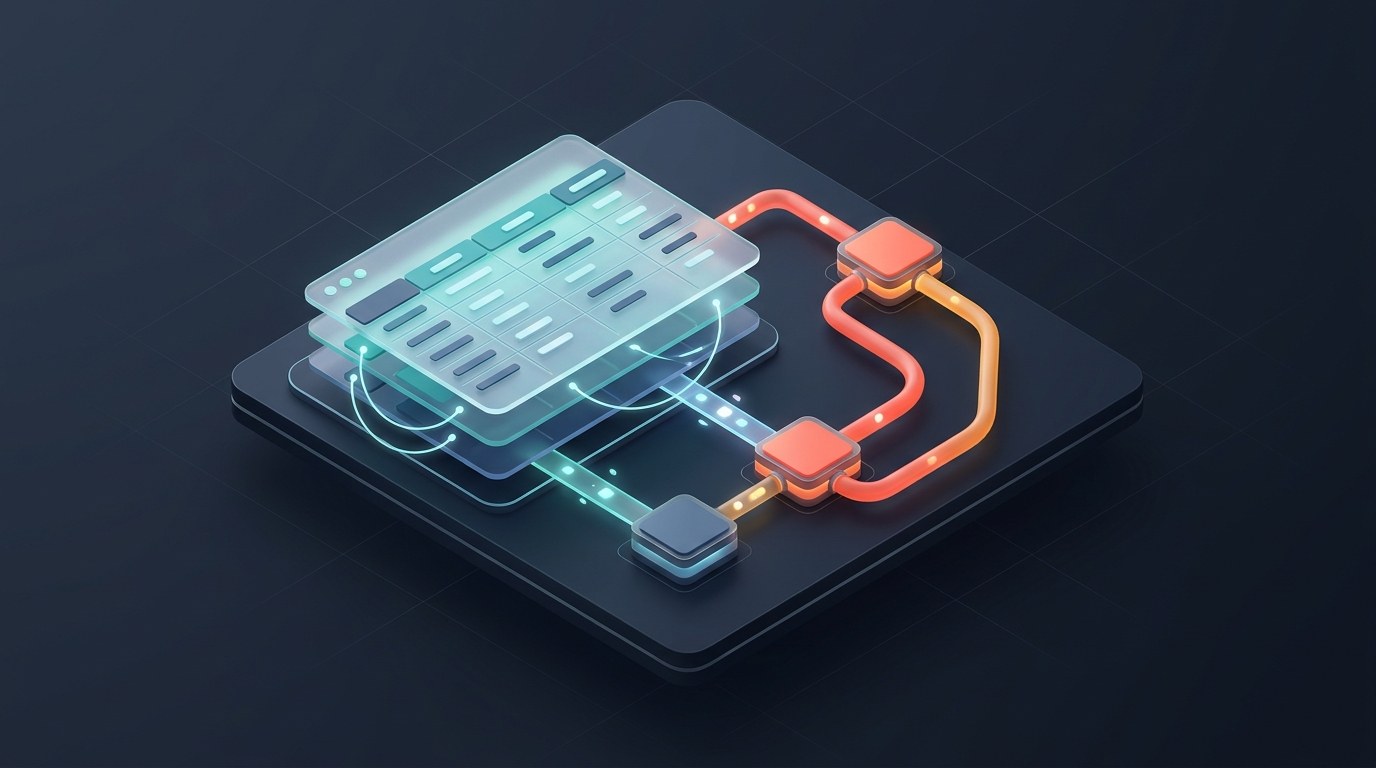
In this guide, we will examine why Google Sheets eventually reaches its limits for automation, what makes NocoDB the natural upgrade path, and how pairing NocoDB with n8n gives you a modern, event-driven data layer without sacrificing the intuitive spreadsheet experience your team loves.
The 4 Walls You Hit with Google Sheets in Automation
When your automation stack relies on Google Sheets, problems rarely appear on Day 1. They creep in as your data deepens, multiple team members start editing simultaneously, and your workflows trigger continuously.
Here are the four primary constraints that push builders beyond spreadsheets:
1. Flat Schemas & Relational Fragility
Google Sheets is inherently two-dimensional: rows and columns on a flat grid. The moment your business logic demands basic relational concepts—such as linking Customers to multiple Orders, or Tasks to Projects—you are forced into fragile VLOOKUP, QUERY, or FILTER formulas.
Because spreadsheets lack foreign keys and cascading referential integrity, deleting or renaming a parent record doesn’t trigger a safe cascade—it leaves orphan rows with silent #REF! or #N/A errors. If a teammate sorts a column without freezing formula ranges or renames a sheet tab, formulas break silently. For an n8n workflow processing critical records, that silent breakdown translates into missing fields, corrupt JSON, or failed downstream automations.
2. Multi-User Collaboration & Race Conditions
Google Sheets was designed for human collaboration, not automated concurrency. When several team members edit cells at the same time an n8n workflow executes:
- There is no field-level locking or record-level transaction safety.
- n8n can easily read partially entered rows, causing data validation errors downstream.
- Edits can overwrite one another without an auditable revision trail per field.
3. The Polling Tax and Hard API Limits
Google Sheets provides no native outward webhooks. Even n8n’s dedicated Google Sheets Trigger node is fundamentally a polling mechanism under the hood: it periodically queries the Google API on a schedule (e.g. every 1 to 5 minutes) and compares the rows against its previously cached state.
This introduces two distinct operational penalties:
- The Polling Tax: Constantly checking for changes wastes n8n execution counts and burns Google API read quotas around the clock—even when nobody is actively editing.
- Artificial Latency: Time-sensitive tasks (like customer approvals or alerts) can sit delayed for minutes waiting for the next polling cycle.
Writing custom Google Apps Script onEdit triggers to push HTTP requests via UrlFetchApp is equally fragile: they are subject to Google execution timeouts, fail silently on bulk edits or permission shifts, and cannot guarantee delivery.
Furthermore, Google enforces strict project quotas: 300 read requests and 300 write requests per minute per project (and 60 requests per minute per user). In an active workspace with multiple parallel workflows, continuous polling quickly leads to 429 Too Many Requests errors.
4. Scale and Calculation Overhead
As a spreadsheet approaches thousands of rows with formulas, Google’s calculation engine slows down. Reading and writing via the API begins to take several seconds per batch call. A real database, by contrast, handles millions of indexed records in milliseconds.
Why NocoDB Is the True Database UI
If you want the visual simplicity of a spreadsheet but need the stability of a production database, NocoDB offers the sweet spot.

Instead of reinventing flat files, NocoDB connects directly to real relational databases (such as PostgreSQL or MySQL). It gives you:
- Real Relational Integrity: Link tables with Many-to-One, One-to-Many, or Many-to-Many connections with foreign keys maintained under the hood.
- Strict Field Types: Dates, Single Selects, Emails, Currency, Attachments, and Rollups that prevent malformed input.
- Instant Native Webhooks: Tables trigger immediate HTTP requests upon insert, update, or deletion—without polling or custom scripts.
- Granular Access Control: Role-based permissions at workspace, base, and view levels.
- Cloud or Self-Hosted: Run on NocoDB Cloud with zero maintenance, or deploy a self-hosted Docker container for complete data ownership and zero external API limits.
Now, let’s explore how NocoDB and n8n work together in practice through two high-leverage automation patterns.
Pattern 1: The Status-Driven Trigger (Human-in-the-Loop)
One of the most powerful workflows in business automation is human-in-the-loop approvals. A human reviews a candidate, lead, or invoice in the visual UI, updates a status dropdown, and the automation handles everything else immediately.
In Google Sheets, this requires continuous polling. In NocoDB, it is an instant event.
The Setup in NocoDB
Consider a leads table containing contact details and a Status field (pending 🟡, approved 🟢, rejected 🔴). When a sales manager marks a lead as approved, we want n8n to immediately trigger downstream actions and stamp the record with an approved_at timestamp.
In NocoDB:
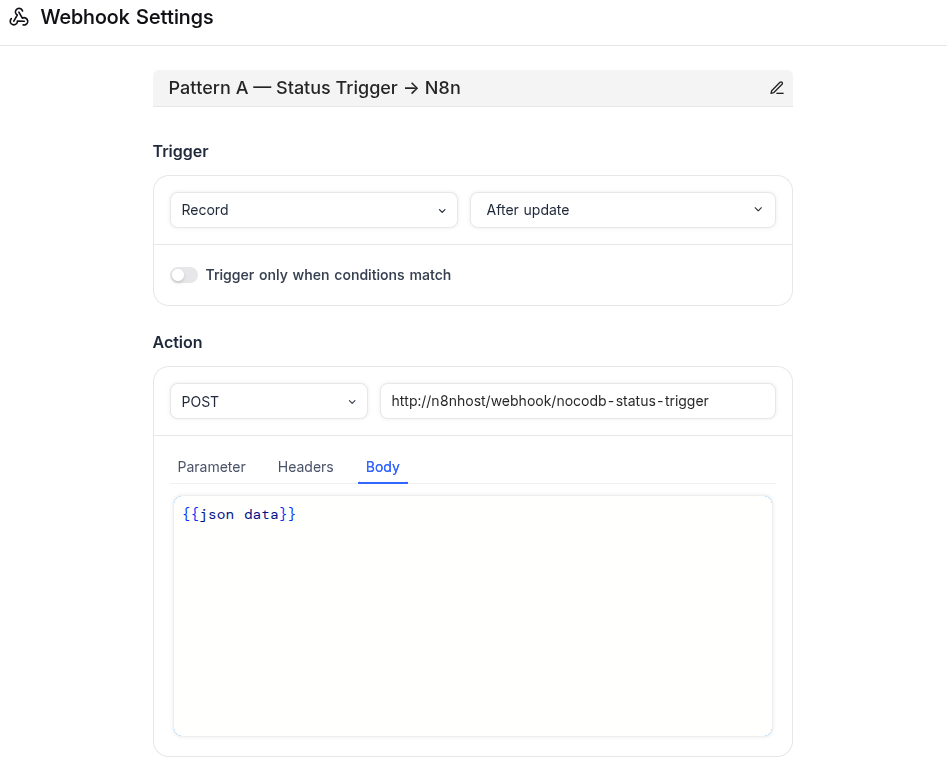
- Open your table’s Webhooks panel.
- Create a webhook for the After Update event.
- Point the target URL to your n8n webhook endpoint:
http://<n8n-host>/webhook/nocodb-status-trigger. - In the Body field, provide the Handlebars template
{{json data}}.
TipWhy
{{json data}}matters: NocoDB v3 webhooks compile through Handlebars. Passing{{json data}}sends both the modified row underrowsand its prior state underprevious_rows. This makes detecting state transitions effortless in n8n.
Building the Workflow in n8n
Here is the flow:
[NocoDB Webhook Trigger]
       ↓ (After Update payload)
[IF Node: Status transitioned to "approved"]
       ↓ (True branch)
[NocoDB Node: Update Row (set approved_at)]
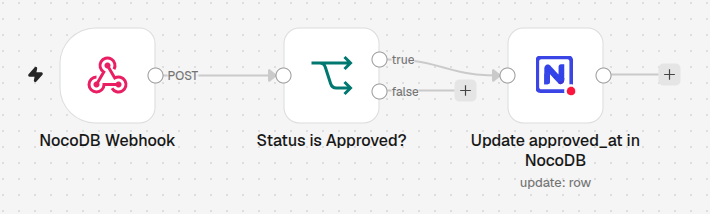
In the native NocoDB node:
- Resource:
Row - Operation:
Update - Base & Table: Select your project and
leadstable from the dropdowns - Row ID Value:
{{ ($json.body.data?.rows || [$json.body])[0]?.Id }} - Fields to Send: Map
approved_atto{{ $now.toISO() }}
Unlike Google Sheets—where updating a record requires n8n to search the sheet for a matching column value (consuming extra API read calls) or rely on shifting row index numbers—NocoDB updates directly by immutable primary key (Id) with database-enforced types.
A Quick Tip on State Transitions
When an n8n workflow updates a record in response to an After Update webhook, you want to make sure that the subsequent write does not trigger unnecessary runs.
Because NocoDB provides both previous_rows and rows in its payload, verifying state changes in your IF node is straightforward: simply check that the status transitioned to approved during this specific update:
- Current Status equals
approved:{{ ($json.body.data?.rows || [$json.body])[0]?.Status }} === 'approved' - Previous Status does NOT equal
approved:{{ ($json.body.data?.previous_rows || [{}])[0]?.Status }} !== 'approved'
When n8n updates approved_at, previous.Status is already approved, so the condition evaluates to false and the execution ends cleanly.
Pattern 2: Automated AI Enrichment on Record Insert
The second pattern demonstrates the reverse: turning NocoDB into an automated knowledge store that enriches itself the moment a record is created.
Imagine a user submits a company name and short inquiry through a NocoDB Form View or external intake. Instead of waiting for a batch script, n8n intercepts the new record, generates a preliminary analysis using an AI model, and writes the summary straight back to the record’s AI Summary field.
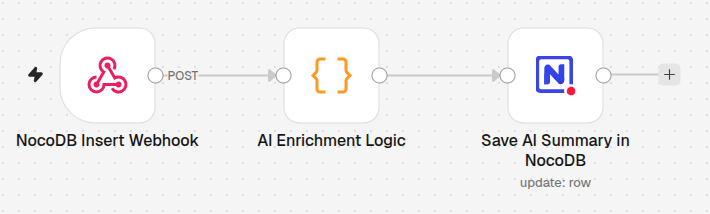
Workflow Steps:
- NocoDB Webhook Trigger: Configured on the
leadstable for the After Insert event. - AI Enrichment Node: Extracts the lead’s company and notes, sending them to an LLM node (such as Gemini, OpenAI, or Groq) in n8n:
const current = ($json.body.data?.rows || [$json.body])[0]; const prompt = `Analyze this prospect and propose a concise next action: Company: ${current.Company} Notes: ${current.Notes}`; - NocoDB Node (Update Row): Uses the native NocoDB node to write the AI summary straight back to the record without any manual HTTP configuration:
- Row ID:
{{ $json.id }} - Fields to Send:
AI Summary={{ $json.summary }}
- Row ID:
Because this webhook triggers exclusively on insert, subsequent updates to the row will never re-trigger the workflow.

Google Sheets vs. NocoDB: When to Choose Which
To help you decide whether it is time to migrate, here is a practical comparison:
| Requirement | Google Sheets | NocoDB + n8n |
|---|---|---|
| Data Model | Flat 2D grid; formulas mimic relationships | Relational database (PostgreSQL/MySQL) with foreign keys |
| Change Detection | Polling every X minutes or unstable Apps Script | Instant native webhooks with previous and current state |
| Rate Limits | 300 read / 300 write requests per minute | Unlimited (self-hosted) or generous tier quotas |
| Concurrent Editing | Risk of race conditions and cell overwrites | Row-level ACID transactions via database backend |
| Field Validation | Loose; accidental text in numeric columns | Strict typed columns (Email, Select, Date, JSON, Attachments) |
| Best Used For | One-off calculations, quick prototypes, sharing with non-tech clients | Production backends, internal CRM/ERP tools, high-frequency automations |
Conclusion
Google Sheets remains an extraordinary tool for Day 1 brainstorming and simple lists. But when your workflows handle mission-critical processes—where missing a webhook or hitting an API quota means operational downtime—it is time to graduate to a proper foundation.
By adopting NocoDB alongside n8n, you get the best of both worlds: a clean, spreadsheet-like interface that your team can use without engineering support, coupled with the speed, transactional safety, and instant webhooks of a real relational database.
Start small: pick one bottlenecked Google Sheet that suffers from frequent updates or rate limits, mirror its columns in NocoDB, and watch your n8n pipelines transform into instant, event-driven automations.